# Download and Install

## Kanimal Clash **Download**

### ![](https://3512338010-files.gitbook.io/~/files/v0/b/gitbook-x-prod.appspot.com/o/spaces%2FzG72Rbyshi3tWfDzhko8%2Fuploads%2FMpJoZifedJyLWtAIjyGk%2Fic_googleplay.png?alt=media\&token=fe04ce51-e37c-450a-81fd-32895c60a729)Google Play : [<mark style="color:blue;">Download ></mark>](https://play.google.com/store/apps/details?id=com.Ludena.kanimalClash\&hl=en\&gl=US)

### ![](https://3512338010-files.gitbook.io/~/files/v0/b/gitbook-x-prod.appspot.com/o/spaces%2FzG72Rbyshi3tWfDzhko8%2Fuploads%2FmhbvmMwpfsGmg3mAHIMJ%2Fic_windows.png?alt=media\&token=e978f2ba-c974-4109-b4f4-11096bb2dc55)Windows : [<mark style="color:blue;">Download ></mark>](https://krk-game-server-prod-geoip-cdn-endpoint-01.azureedge.net/krkgameapk/\[Prod]Kanimal_v1.2.1_20230417_PC.zip)

{% hint style="info" %}
**If the Google Play download link does not work, please use the download link below it.**

![](https://3512338010-files.gitbook.io/~/files/v0/b/gitbook-x-prod.appspot.com/o/spaces%2FzG72Rbyshi3tWfDzhko8%2Fuploads%2FP5r51jL4BJvhtASXkKLO%2Fic_android.png?alt=media\&token=d2a51425-eee6-45c8-b07b-2ed93fb80a2d)**Android APK :** [<mark style="color:blue;">**Download >**</mark>](https://krk-game-server-prod-geoip-cdn-endpoint-01.azureedge.net/krkgameapk/\[Prod]Kanimal_v1.2.1_20230417_Android.zip)
{% endhint %}

{% hint style="warning" %} <mark style="color:red;">Can be downloaded anywhere except Korea.</mark>
{% endhint %}

##

## **How to install**

### **Android Preparation : In unknown app permission**

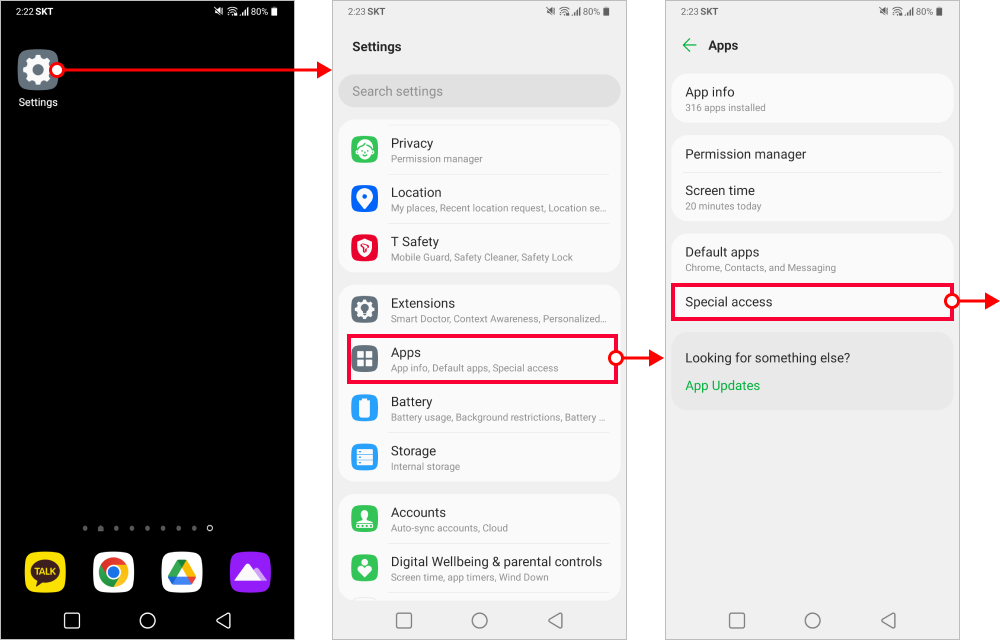
In order to download the game without going through the Google PlayStore, the device needs to be change the settings of "unknown app" permission. This guide will show how to allow unknown application to install on the Android device but the process may vary depending on which device one might use.

#### 01. Settings > Apps > Special access

<figure><img src="https://3512338010-files.gitbook.io/~/files/v0/b/gitbook-x-prod.appspot.com/o/spaces%2FzG72Rbyshi3tWfDzhko8%2Fuploads%2FDcsfFP5Mx4WBzKEJdTIT%2FAndroid%20unknown%20app%20permission_img%201.png?alt=media&#x26;token=f883a6d9-4d4f-4c5a-9aa5-1f4e74f0b47c" alt=""><figcaption></figcaption></figure>

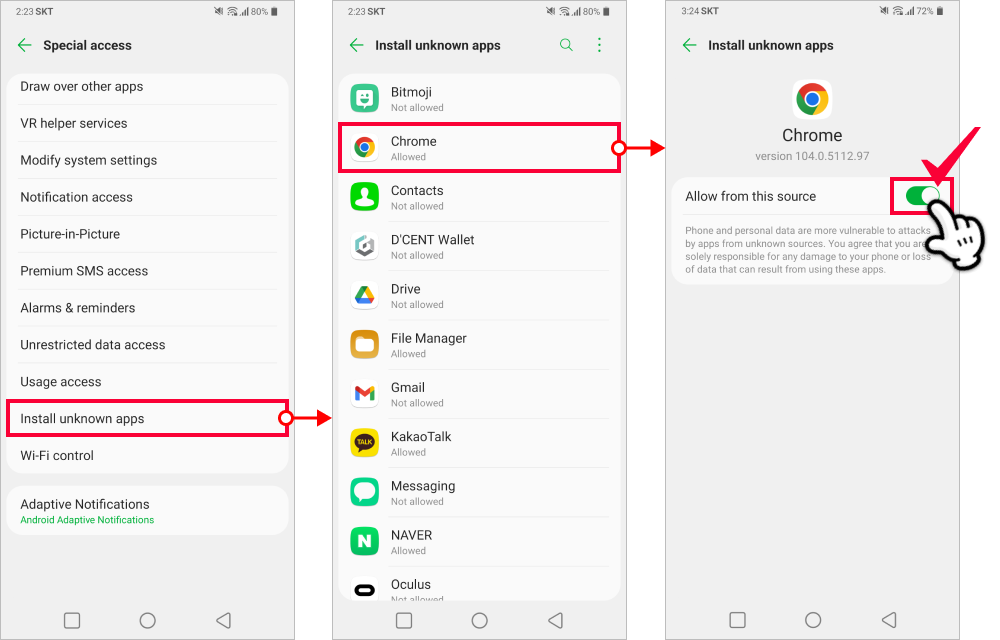
#### 02. Install unknown > Select which browser you want to download the game through > Allow unknown application&#x20;

Selecting the browser application : If you want to download using the “Chrome” browser, please select "Chrome" application.

(Allow File Manager to install application through the File Manager)&#x20;

<figure><img src="https://3512338010-files.gitbook.io/~/files/v0/b/gitbook-x-prod.appspot.com/o/spaces%2FzG72Rbyshi3tWfDzhko8%2Fuploads%2FKe210e9zCf6GptdmxIvs%2FAndroid%20unknown%20app%20permission_img%202.png?alt=media&#x26;token=a78b3285-b5e5-4d10-bbe7-3adcb65e0897" alt=""><figcaption></figcaption></figure>

### **Android Installation Process : Installing after downloading through the permitted browser**

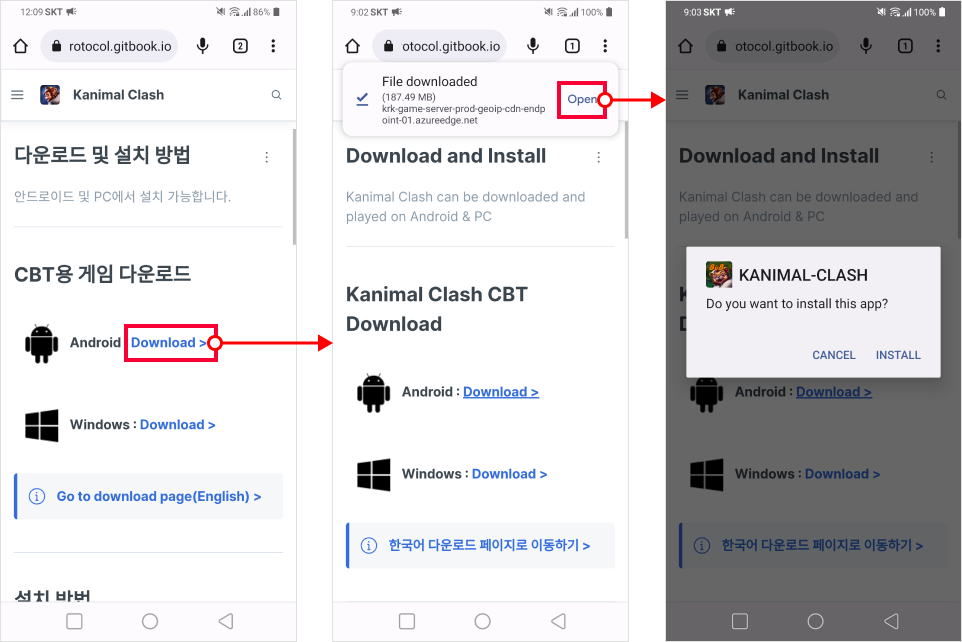
Select the browser app (ex. Chrome) permitted to download unknown app and open download page. (Allow File Manager to install application through the File Manager)&#x20;

**1. Android : Download > Open**

<figure><img src="https://3512338010-files.gitbook.io/~/files/v0/b/gitbook-x-prod.appspot.com/o/spaces%2FzG72Rbyshi3tWfDzhko8%2Fuploads%2Fd20VCDZWmzqTCYBhPsPs%2FInstalling%20after%20downloading%20through%20the%20permitted%20browser_en%201.png?alt=media&#x26;token=50e153d8-8508-4ce0-abbc-d11cd20b83e0" alt=""><figcaption></figcaption></figure>

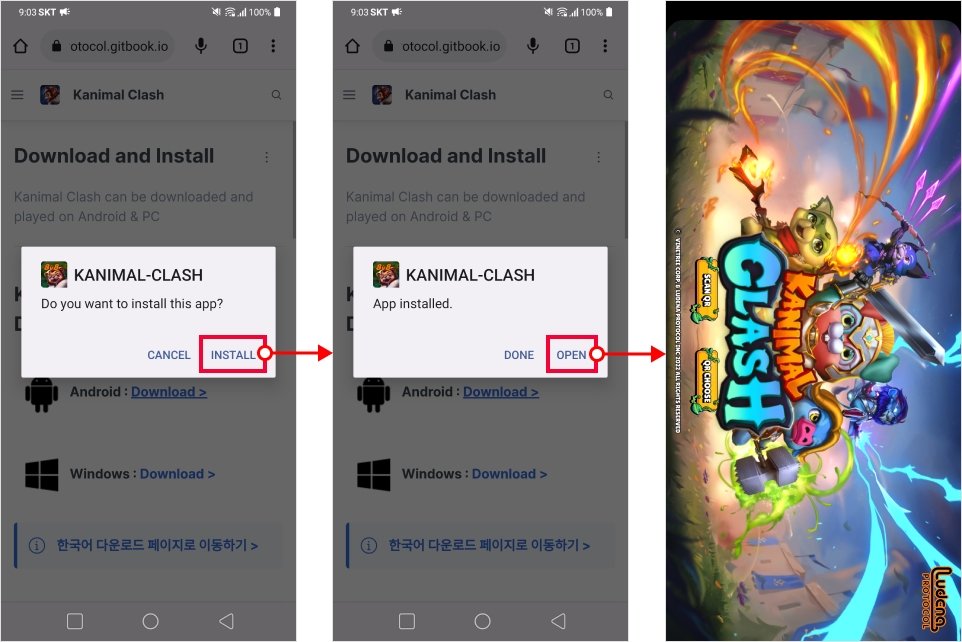
**2. Install > Open**

<figure><img src="https://3512338010-files.gitbook.io/~/files/v0/b/gitbook-x-prod.appspot.com/o/spaces%2FzG72Rbyshi3tWfDzhko8%2Fuploads%2Fzgy28mru6reFEYZ5Q61r%2FInstalling%20after%20downloading%20through%20the%20permitted%20browser_en%202.png?alt=media&#x26;token=a6b149b9-5436-4a59-8ef0-29df4150a5f8" alt=""><figcaption></figcaption></figure>